gk28-01 Note Determiner, Version 2
30 points
OEES 235
|
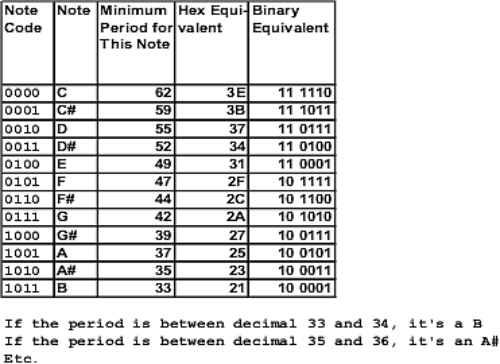 Table 1 |
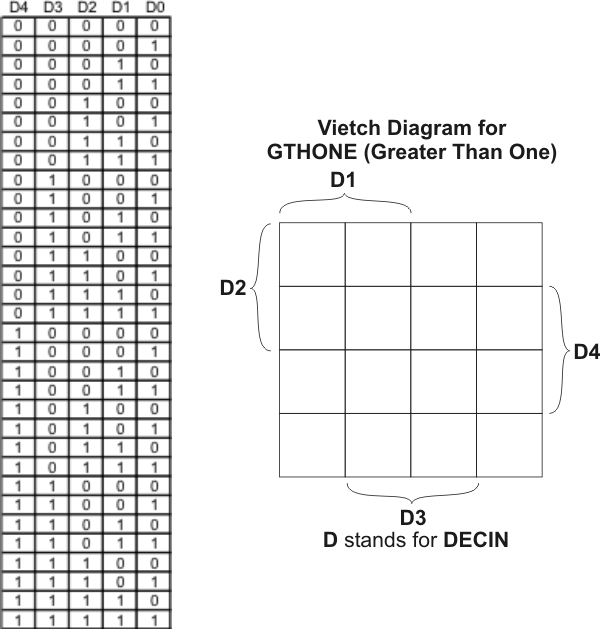 Figure 2 |
| This project is the last block we'll be
developing. Our job in the next project will be to assemble all the
blocks we've created into one schematic that represents the entire tone
translator. How the Circuit for This Project Works In the previous version of the note determiner circuit (gk19-11), the NOTESEL output lines only had correct values when the STHO input lines had exactly the right values for particular musical notes. Otherwise, the NOTESEL lines became all high. In this project, we'll add some circuitry that will cause the note determiner to accept a range of input values for each note. This circuitry will operate as follows:
|
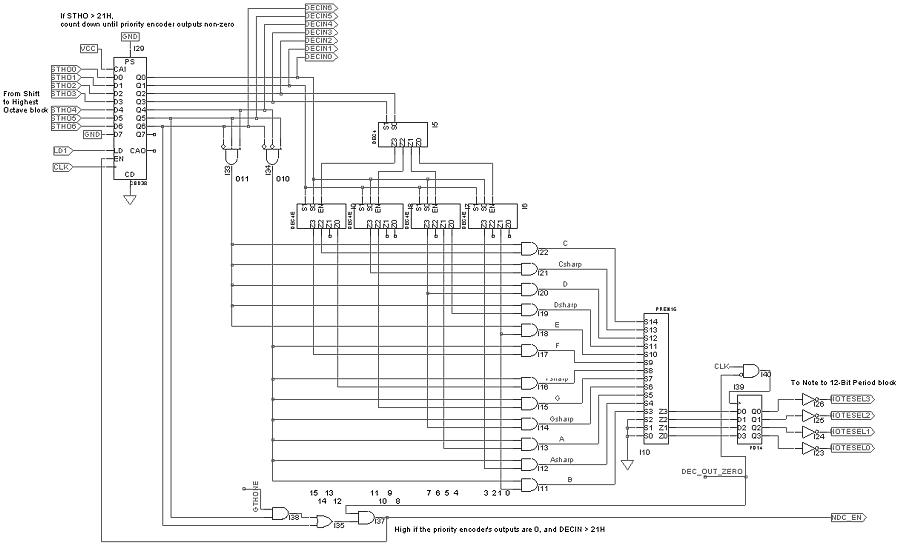
| Your Job For this project, you'll be determining what gates are necessary to provide the following signals: GTHONE and DEC_OUT_ZERO. Right-click here to download the partial schematic shown in Figure 1 above. Gates to Produce GTHONE GTHONE stands for greater than one. This signal should go high when DECIN4 through DECIN0 contain a number greater than one. You
don't need to understand the following indented paragraphs to do this
project. They are here just in case you want to know more details
about what's going on.
Notice that the OR gate and two AND gates at the bottom of the schematic produce the signal NDC_EN, assuming that the correct GTHON signal is put into the AND gate on the left. When the counter-enable signal NDC_EN is high, the counter will count down. When NDC_EN goes low again, the counter outputs should contain one of the period numbers shown in Table 1 above.. Remember that one condition
for enabling the counter is that DECIN (DECIN6 through DECIN0) must
contain a number higher than 21H (binary 010 0001). If DECIN6 is high,
we have a number of 100 0000 or higher. In other words, If DECIN6 is
high, we don't need to look any further--we know that DECIN contains a
number higher than 010 0001.
If for some reason, DECIN5
is low, we have a number of 001 1111 or smaller. This indicates that
something is wrong, because we shouldn't be having period numbers
smaller than 10 0001 (see Table 1). In other words, if DECIN5 is low,
we don't want to count down. (Because the outputs of the priority
encoder would never reach a number other than zero until the counter
hit 00 0000 and then started counting down from 11 1111 until it
reached 11 1110, the value for the note C. At this point, one of
the outputs of the priority would go high, and the counter would stop.)
The above two paragraphs
explain why AND gate I38 has DECIN5 as one of it's inputs and OR
gate I35 has DCIN6 as one of it's inputs.
In Figure 2 above, there is a table showing all the possible combinations for DECIN4 through DECIN0 (shortened to D4 through D0). Basically, the table contains binary numbers from 0 to 32. To produce the GTHONE signal, you need to determine what gates to use for looking at D4 through D0, such that GTHONE will go high for binary numbers 2 through 32. One hint is that you can ignore D0. You'll only need to use D4 through D1 as inputs to the gates. The Vietch diagram in Figure 2 can help you determine what gates to use. Look at the table to the left of the Vietch diagram. The easiest way to fill in the Vietch diagram is to notice that GTHONE should be high for all the rows in the table except the first two. These first two rows contain the numbers 00000 and 00001, neither of which are greater than one. For all the other rows, D4 through D0 contain numbers greater than one, and GTHONE should be high. So, put zeroes in the Veitch diagram for the numbers 00000 and 00001. Then, put ones everywhere else. You can now draw circles to come up with the simplest expression to produce the GTHONE signal. Gates to Produce DEC_OUT_ZERO This signal is simpler to create than GTHONE. Basically, you need to have a gate (or gates) to give you a high when the outputs of the priority encoder are all zero. Once you've added gates to produce the GTHONE and DEC_OUT_ZERO signals, the circuit should work. Right-click here to get the test vector file, and see if you get the waveforms shown below. |
 Figure 3  Figure 4 |

