T120   08 0214

HB14-11 Burglar Alarms
Multisim & Real Components               30 points
OEET 120

Back to Main Page
 Multisim Portion


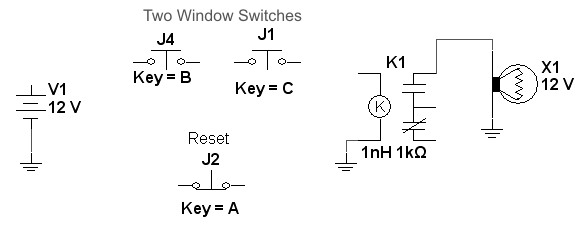
  1. In Multisim, go to the blue Basic Family icon and choose Virtual Combination Relay.
  2. Modify the relay shown above so that it has a coil inductance of 1 nH, a coil resistance of 1 kohm, an on current of 10 mA, and an off current of 5 mA.
  3. Create a regular schematic (as opposed to one that uses ladder diagrams).
  4. Omit the normally-closed pushbutton A, and connect the above components so that you get a circuit that functions as follows:
    • If either button B or C is pressed, the light will go on.
  5. Now, include button A and modify the circuit so that it will work as follows:
    • If either button B or C is pressed, the light will go on and stay on until button A is pressed.


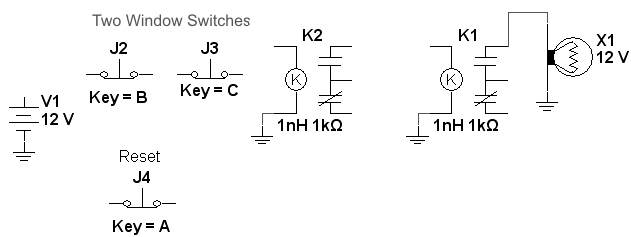
  1. Make a copy of the relay from the previous circuit so that you now have two relays, as shown above.
  2. Connect the above components so that you get a circuit that functions as follows:
    • If either button B or C is pressed, the light will go on and stay on until pushbutton A is pressed, at which point the light will go off and stay off. Notice that B and C are normally-closed buttons.
Hints:
  • Connect the left-hand relay so that its coil is energized all the time, except for when button B or C is pressed.
  • If you press button B or C, the left relay will become de-energized. When you release the button you pressed, the relay will become energized again.
  •  When the left-hand relay is de-energized, the right-hand relay should be energized.
  • Once the right relay has been energized, it will remain energized until someone presses the Reset button.
 

Real Component Portion

  • Caution: Before you power-up your circuit, be sure the power supply is set for 12 volts. Otherwise, you may burnout a relay coil.
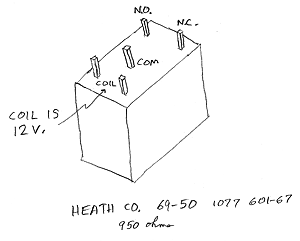
  • Using Heath 12 V. relays (as shown above), connect the two-relay circuit that you simulated in Multisim.
  • Instead of using pushbuttons, use wires inserted into the breadboard.

Back to Main Page